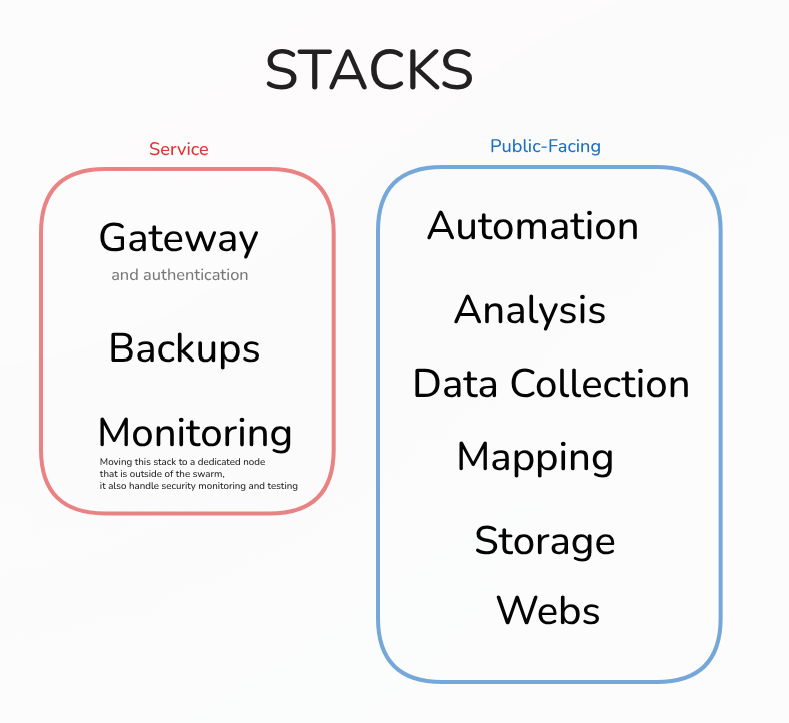
2025 fue un año decisivo para la «fontanería interna» de mi infraestructura. Llegué a un punto en el que ya no podía depender de contenedores aislados y con estado. Para garantizar una continuidad de servicio fiable, invertí mucho tiempo y esfuerzo en construir un sistema orquestado.
Aunque Coolify fue una introducción intuitiva a los conceptos básicos de DevOps, con el tiempo topé con sus limitaciones. En aquel momento carecía de una orquestación real, y cualquier configuración no soportada de forma directa por la interfaz de Coolify —como usar un usuario que no fuera root como administrador— era casi imposible de implementar. Por otro lado, no fue fácil renunciar a un proceso de despliegue tan sencillo para aplicaciones como los sitios nuxt. Sin embargo, alejarme de esa «vía fácil» me empujó a entender de verdad CI/CD y GitHub Actions.
El despliegue en realidad no fue tan difícil, sobre todo usando este enfoque de un solo script que seguí del canal de YouTube de Jim’s Garage. Solo tuve que hacer algunos cambios para acceder a mi red de Tailscale y a una unidad NFS compartida. El script con datos anonimizados está más abajo.
Esto me permite alojar mis propias webs, como la que estás leyendo, así como mis propias aplicaciones, agentes de IA y más. No obstante, la única forma de garantizar la alta disponibilidad es abrir esta infraestructura a algunos servicios externos, concretamente VPS en los que pueda confiar, aunque siempre administrándolos yo mismo.
También me he pasado a hacer mis aplicaciones sin estado (de nuevo, 2025 fue un año ajetreado). Para lograrlo, tuve que recurrir al servicio externo Supabase, que hasta ahora ha funcionado increíblemente bien. Solo dependo de él para el funcionamiento interno de algunas aplicaciones. El grueso de mi información está alojado en las instalaciones, en Postgres y Qdrant autoalojados.
En resumen, una configuración híbrida ha demostrado ser la más equilibrada en términos de fiabilidad, alta disponibilidad, privacidad, soberanía y velocidad.
#!/bin/bash

# ==============================================================================
# AUTOMATED DOCKER SWARM & NFS CLUSTER SETUP
# ==============================================================================
# Description:
#   This script automates the creation of a Docker Swarm cluster across multiple
#   nodes. It handles SSH key distribution, Docker installation, Swarm init/join,
#   and mounting a shared NFS volume for persistent storage.
#
# Pre-requisites:
#   1. A control machine (where you run this script) with SSH access to all nodes.
#   2. Valid DNS names or IP addresses for all nodes.
#   3. A NAS or server exporting an NFS share.
# ==============================================================================

# Exit immediately if a command exits with a non-zero status.
set -e

# A fancy banner to start things off.
echo -e " \033[33;5m Setting up the Resilient Hybrid Swarm Cluster \033[0m"

##################################################################
# [USER CONFIGURATION] - EDIT THIS SECTION
##################################################################

# --- Swarm Nodes (IP Addresses or Hostnames) ---
# Tip: If using Tailscale/VPN, use the VPN IP addresses here.
manager_1_ip="192.168.1.10"
manager_2_ip="192.168.1.11"
worker_1_ip="192.168.1.20"
worker_2_ip="192.168.1.21"
worker_3_ip="192.168.1.22"

# --- Storage Node (NFS Server) ---
# The IP of your NAS or NFS server.
nfs_server_ip="192.168.1.100"

# The path on the NFS server to mount (e.g. /volume1/data).
nfs_share_path="/path/to/remote/share"

# Where to mount the storage on the Docker nodes.
local_mount_point="/mnt/swarm-data"

# --- SSH Configuration ---
# The username to log in to remote nodes (must have sudo privileges).
ssh_user="your_ssh_username"

# The name of your local private key file (usually in ~/.ssh/).
ssh_key_name="id_ed25519"

# --- Internal Grouping (No need to edit below) ---
primary_manager=$manager_1_ip
all_managers=($manager_1_ip $manager_2_ip)
all_workers=($worker_1_ip $worker_2_ip $worker_3_ip)
all_nodes=(${all_managers[@]} ${all_workers[@]})


##################################################################
# SCRIPT LOGIC
##################################################################

echo "[PHASE 1/5] Distributing SSH keys for passwordless access..."
for node in "${all_nodes[@]}"; do
  echo "--> Copying SSH key to node: $node"
  # Note: This requires you to enter the password once per node if not already authorized.
  ssh-copy-id -i ~/.ssh/$ssh_key_name.pub $ssh_user@$node
done
echo "[+] SSH keys distributed successfully."
echo "------------------------------------------------------------"


echo "[PHASE 2/5] Installing Docker and NFS client on all nodes..."
for node in "${all_nodes[@]}"; do
  echo "--> Configuring node: $node"
  ssh $ssh_user@$node -i ~/.ssh/$ssh_key_name 'sudo bash -s' <<'EOF'
    set -e

    # [OPTIONAL] Flush Firewall - UNCOMMENT WITH CAUTION
    # This removes all firewall rules. Only do this if you are behind a secure VPC or VPN.
    # iptables -F
    # iptables -P INPUT ACCEPT
    # echo "--> Firewall flushed (caution advised)."

    echo "--> Installing Docker using the official convenience script..."
    if ! command -v docker &> /dev/null; then
        curl -fsSL https://get.docker.com | sh
        echo "--> Docker installed."
    else
        echo "--> Docker is already installed. Skipping."
    fi

    echo "--> Installing NFS client..."
    apt-get update -qq
    apt-get install -y nfs-common > /dev/null
    echo "--> NFS client installed."
EOF
  echo "--> Node $node configured successfully."
done
echo "[+] All nodes have Docker and NFS client installed."
echo "------------------------------------------------------------"


echo "[PHASE 3/5] Initializing Swarm and creating Manager High Availability..."
echo "--> Initializing Swarm on primary manager: $primary_manager"

# We check if Swarm is already active to make the script idempotent (re-runnable).
is_swarm_active=$(ssh $ssh_user@$primary_manager -i ~/.ssh/$ssh_key_name "sudo docker info --format '{{.Swarm.LocalNodeState}}'")

if [ "$is_swarm_active" == "active" ]; then
    echo "--> Swarm is already active on primary manager. Retrieving tokens..."
    manager_join_token=$(ssh $ssh_user@$primary_manager -i ~/.ssh/$ssh_key_name "sudo docker swarm join-token manager -q")
else
    manager_join_token=$(ssh $ssh_user@$primary_manager -i ~/.ssh/$ssh_key_name "sudo docker swarm init --advertise-addr $primary_manager && sudo docker swarm join-token manager -q")
    echo "[+] Swarm initialized."
fi

# Join Secondary Managers
for node in "${all_managers[@]}"; do
    if [ "$node" != "$primary_manager" ]; then
        echo "--> Joining secondary manager ($node) to the Swarm..."
        ssh $ssh_user@$node -i ~/.ssh/$ssh_key_name "sudo docker swarm join --token $manager_join_token $primary_manager:2377" || echo "--> Node $node might already be in the swarm."
    fi
done
echo "[+] Managers configured."
echo "------------------------------------------------------------"


echo "[PHASE 4/5] Joining worker nodes to the Swarm..."
worker_join_token=$(ssh $ssh_user@$primary_manager -i ~/.ssh/$ssh_key_name "sudo docker swarm join-token worker -q")

for node in "${all_workers[@]}"; do
  echo "--> Joining worker: $node"
  ssh $ssh_user@$node -i ~/.ssh/$ssh_key_name "sudo docker swarm join --token $worker_join_token $primary_manager:2377" || echo "--> Node $node might already be in the swarm."
done
echo "[+] All worker nodes have joined the Swarm."
echo "------------------------------------------------------------"


echo "[PHASE 5/5] Configuring shared NFS storage on all Swarm nodes..."
for node in "${all_nodes[@]}"; do
  echo "--> Configuring NFS mount on: $node"
  ssh $ssh_user@$node -i ~/.ssh/$ssh_key_name 'sudo bash -s' <<EOF
    set -e
    mkdir -p ${local_mount_point}

    # Check if entry already exists in fstab to prevent duplicates
    if ! grep -q "${nfs_server_ip}:${nfs_share_path}" /etc/fstab; then
        echo "--> Adding NFS mount to /etc/fstab..."
        # 'nofail' ensures the server can still boot if the NAS is offline
        echo "${nfs_server_ip}:${nfs_share_path} ${local_mount_point} nfs defaults,nofail 0 0" >> /etc/fstab
    else
        echo "--> NFS mount already exists in /etc/fstab. Skipping."
    fi

    echo "--> Mounting all filesystems..."
    mount -a
EOF
  echo "--> NFS configured on node $node."
done
echo "[+] Shared NFS storage configured on all nodes."
echo "------------------------------------------------------------"

echo -e "\033[32;5m[+] CLUSTER SETUP COMPLETE! \033[0m"
echo "Your hybrid Swarm cluster is ready."
echo "Verify the cluster status by running:"
echo "ssh $ssh_user@$primary_manager sudo docker node ls"
Utilizo Portainer como punto de entrada al Swarm.
Lo he estructurado en stacks funcionales para organizarlo y aislarlo: