2025 was a pivotal year for my infrastructure’s “internal plumbing.” I reached a point where I could no longer rely on isolated, stateful containers. To ensure reliable service continuity, I invested significant time and effort into building an orchestrated system.
While Coolify was an intuitive introduction to basic DevOps concepts, I eventually hit its limitations. At the time, it lacked true orchestration, and any configuration not naively supported by the Coolify interface—such as using a non-root user as an admin—was nearly impossible to implement. On the other hand, it wasn’t easy to let go of such a simple deployment process for apps like nuxt sites. However, moving away from that “easy way” pushed me to truly understand CI/CD and GitHub Actions.
The deployment wasn’t that hard actually, especially using this approach of one script that I followed from Jim’s Garage YouTube channel. I only had to make some changes to access my Tailscale network and to access a shared NFS drive. The script with anonymous data is below.
This allows me to host my own webs, like the one you are reading from, as well as my own apps, AI agents and more. Nevertheless, the only way to ensure high availability is to open this infrastructure to some off-site services, specifically VPSs that I can rely on, although always administrating myself.
I have also moved into making my apps stateless (again, 2025 was a busy year). To achieve this, I had to rely on the Supabase external service, which so far has worked amazingly well. I only depends on it for the internal functioning of some apps. The bulk of my information is hosted on-site, in self-hosted Postgres and Qdrant.
In summary, an hybrid setup has shown to be the most balanced setup in terms of reliability, high availability, privacy, sovereignty and speed.
#!/bin/bash

# ==============================================================================
# AUTOMATED DOCKER SWARM & NFS CLUSTER SETUP
# ==============================================================================
# Description:
#   This script automates the creation of a Docker Swarm cluster across multiple
#   nodes. It handles SSH key distribution, Docker installation, Swarm init/join,
#   and mounting a shared NFS volume for persistent storage.
#
# Pre-requisites:
#   1. A control machine (where you run this script) with SSH access to all nodes.
#   2. Valid DNS names or IP addresses for all nodes.
#   3. A NAS or server exporting an NFS share.
# ==============================================================================

# Exit immediately if a command exits with a non-zero status.
set -e

# A fancy banner to start things off.
echo -e " \033[33;5m Setting up the Resilient Hybrid Swarm Cluster \033[0m"

##################################################################
# [USER CONFIGURATION] - EDIT THIS SECTION
##################################################################

# --- Swarm Nodes (IP Addresses or Hostnames) ---
# Tip: If using Tailscale/VPN, use the VPN IP addresses here.
manager_1_ip="192.168.1.10"
manager_2_ip="192.168.1.11"
worker_1_ip="192.168.1.20"
worker_2_ip="192.168.1.21"
worker_3_ip="192.168.1.22"

# --- Storage Node (NFS Server) ---
# The IP of your NAS or NFS server.
nfs_server_ip="192.168.1.100"

# The path on the NFS server to mount (e.g. /volume1/data).
nfs_share_path="/path/to/remote/share"

# Where to mount the storage on the Docker nodes.
local_mount_point="/mnt/swarm-data"

# --- SSH Configuration ---
# The username to log in to remote nodes (must have sudo privileges).
ssh_user="your_ssh_username"

# The name of your local private key file (usually in ~/.ssh/).
ssh_key_name="id_ed25519"

# --- Internal Grouping (No need to edit below) ---
primary_manager=$manager_1_ip
all_managers=($manager_1_ip $manager_2_ip)
all_workers=($worker_1_ip $worker_2_ip $worker_3_ip)
all_nodes=(${all_managers[@]} ${all_workers[@]})


##################################################################
# SCRIPT LOGIC
##################################################################

echo "[PHASE 1/5] Distributing SSH keys for passwordless access..."
for node in "${all_nodes[@]}"; do
  echo "--> Copying SSH key to node: $node"
  # Note: This requires you to enter the password once per node if not already authorized.
  ssh-copy-id -i ~/.ssh/$ssh_key_name.pub $ssh_user@$node
done
echo "[+] SSH keys distributed successfully."
echo "------------------------------------------------------------"


echo "[PHASE 2/5] Installing Docker and NFS client on all nodes..."
for node in "${all_nodes[@]}"; do
  echo "--> Configuring node: $node"
  ssh $ssh_user@$node -i ~/.ssh/$ssh_key_name 'sudo bash -s' <<'EOF'
    set -e

    # [OPTIONAL] Flush Firewall - UNCOMMENT WITH CAUTION
    # This removes all firewall rules. Only do this if you are behind a secure VPC or VPN.
    # iptables -F
    # iptables -P INPUT ACCEPT
    # echo "--> Firewall flushed (caution advised)."

    echo "--> Installing Docker using the official convenience script..."
    if ! command -v docker &> /dev/null; then
        curl -fsSL https://get.docker.com | sh
        echo "--> Docker installed."
    else
        echo "--> Docker is already installed. Skipping."
    fi

    echo "--> Installing NFS client..."
    apt-get update -qq
    apt-get install -y nfs-common > /dev/null
    echo "--> NFS client installed."
EOF
  echo "--> Node $node configured successfully."
done
echo "[+] All nodes have Docker and NFS client installed."
echo "------------------------------------------------------------"


echo "[PHASE 3/5] Initializing Swarm and creating Manager High Availability..."
echo "--> Initializing Swarm on primary manager: $primary_manager"

# We check if Swarm is already active to make the script idempotent (re-runnable).
is_swarm_active=$(ssh $ssh_user@$primary_manager -i ~/.ssh/$ssh_key_name "sudo docker info --format '{{.Swarm.LocalNodeState}}'")

if [ "$is_swarm_active" == "active" ]; then
    echo "--> Swarm is already active on primary manager. Retrieving tokens..."
    manager_join_token=$(ssh $ssh_user@$primary_manager -i ~/.ssh/$ssh_key_name "sudo docker swarm join-token manager -q")
else
    manager_join_token=$(ssh $ssh_user@$primary_manager -i ~/.ssh/$ssh_key_name "sudo docker swarm init --advertise-addr $primary_manager && sudo docker swarm join-token manager -q")
    echo "[+] Swarm initialized."
fi

# Join Secondary Managers
for node in "${all_managers[@]}"; do
    if [ "$node" != "$primary_manager" ]; then
        echo "--> Joining secondary manager ($node) to the Swarm..."
        ssh $ssh_user@$node -i ~/.ssh/$ssh_key_name "sudo docker swarm join --token $manager_join_token $primary_manager:2377" || echo "--> Node $node might already be in the swarm."
    fi
done
echo "[+] Managers configured."
echo "------------------------------------------------------------"


echo "[PHASE 4/5] Joining worker nodes to the Swarm..."
worker_join_token=$(ssh $ssh_user@$primary_manager -i ~/.ssh/$ssh_key_name "sudo docker swarm join-token worker -q")

for node in "${all_workers[@]}"; do
  echo "--> Joining worker: $node"
  ssh $ssh_user@$node -i ~/.ssh/$ssh_key_name "sudo docker swarm join --token $worker_join_token $primary_manager:2377" || echo "--> Node $node might already be in the swarm."
done
echo "[+] All worker nodes have joined the Swarm."
echo "------------------------------------------------------------"


echo "[PHASE 5/5] Configuring shared NFS storage on all Swarm nodes..."
for node in "${all_nodes[@]}"; do
  echo "--> Configuring NFS mount on: $node"
  ssh $ssh_user@$node -i ~/.ssh/$ssh_key_name 'sudo bash -s' <<EOF
    set -e
    mkdir -p ${local_mount_point}

    # Check if entry already exists in fstab to prevent duplicates
    if ! grep -q "${nfs_server_ip}:${nfs_share_path}" /etc/fstab; then
        echo "--> Adding NFS mount to /etc/fstab..."
        # 'nofail' ensures the server can still boot if the NAS is offline
        echo "${nfs_server_ip}:${nfs_share_path} ${local_mount_point} nfs defaults,nofail 0 0" >> /etc/fstab
    else
        echo "--> NFS mount already exists in /etc/fstab. Skipping."
    fi

    echo "--> Mounting all filesystems..."
    mount -a
EOF
  echo "--> NFS configured on node $node."
done
echo "[+] Shared NFS storage configured on all nodes."
echo "------------------------------------------------------------"

echo -e "\033[32;5m[+] CLUSTER SETUP COMPLETE! \033[0m"
echo "Your hybrid Swarm cluster is ready."
echo "Verify the cluster status by running:"
echo "ssh $ssh_user@$primary_manager sudo docker node ls"
I am using Portainer as my entry point to the Swarm.
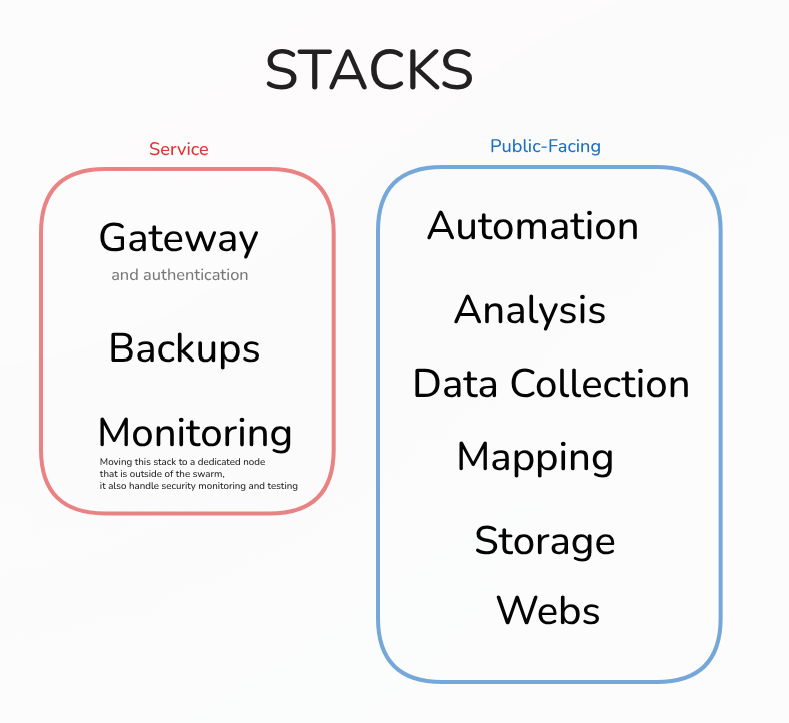
I have structured it in functional stacks for organization and isolation: